Vintage Computer Festival Midwest Chats & Interviews

The Vintage Computer Festival Midwest is a fun event in the Chicago suburbs. It's a chance to connect with fellow enthusiasts and see some incredible vintage hardware. I wanted to show a bit of my exploring and conversations with people. This was my second time visiting. 

A lenticular Commodore 64 motherboard image on display.

I was immediately drawn to a display featuring a Commodore 64 motherboard. The presenter even had a cool visual effect: if you moved your head back and forth, the RF shield appeared to lift off, revealing the components underneath! Also the glass acted like an actual magnifying glass, which was neat to look through.

100 year old typewriter next to the C64 photo.

Taking photos.

A typewriter collector had brought a piece that was almost a century old, stating that he picked it up for cheap at a garage sale.

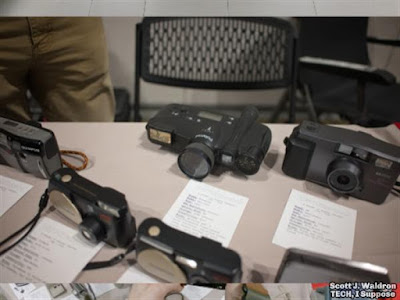
A whole table full of various types of camera technology.

A view of various MSX computers on a table.

Various MSX computers were on display, representing a collaboration between Microsoft and the ASCII Corporation.

Telecom networking equipment.

A beautiful wood electronic chess game.

This wooden electronic chess set really stood out. It was a Fidelity, made back in the 1980s. It was a beautiful piece of craftsmanship.

The internals of a Chuck E. Cheese animatronic setup.

The creator of the exhibit explained that the system was based on a 6502 processor like a lot of the technology at that time and how they re-created a lot of the circuit boards that make up the animatronic system.

This is a deep dive into the hardware that makes it all work.

The system was based on the same team, and some tech, that designed the Atari 2600.

A look at vintage cameras on display.

The original Polaroid digital camera.


Check out the linked video for a lot more information! 


Here is the video on YouTube where it's GoPro footage of conversations I had. 


Popular posts from this blog

Reviewing the Thermalright TL-G12 and TL-C14 Fans

I recently picked up a bunch of Thermalright fans for a new PC build, specifically the TL-G12 (120mm) and the TL-C14 (140mm). At the time, they were pretty inexpensive, and the promise of fluid dynamic bearings (FDB) along with PWM control sounded like a great deal on paper, so I bought quite a few of each. In this article and related video I go into detail about their installation and use.  Boxes for the Thermalright TL-G12 and TL-C14 fans. Specifications listed on the TL-G12 fan box. Specifications for the 120mm TL-G12: Speed: 1500 RPM (+/- 10%) Noise: Rated 23.6 dBA or greater. Airflow: Up to 62.6 CFM Connector: 4-pin PWM with a daisy-chain feature. Extras: Includes rubber pads on the corners for vibration dampening and standard case screws. One thing I noticed on the G12 frame is the lack of an airflow direction indicator, but it's a standard fan design, so it's easy enough to figure out. Specifications shown on the TL-C14 fan documentation. Specifications of the 140 mm TL-...

Upgrading from GTX 1060 to RTX 4060: Performance Gains in an Older System

(I used Claude AI to generate this article based on my video's transcript, so keep that in mind it might not be perfect even though I've gone through it to correct any issues I see. Also keep in mind that I've done further testing with an ASUS Proart 4060 compared to the MSI 1060 on my old PC and noticed a few situations where the CPU was limiting performance such as FFXIV minimum framerates.) I recently decided to take a look at the GIGABYTE RTX 4060 low profile version. This was the cheapest RTX 4060 card I could find as an Amazon Warehouse Deal, and I was curious to see if my old computer would benefit from upgrading from a GTX 1060 6GB to this new card. Low profile! My current system is built around an Intel i7-6700 CPU, which is likely to be the main limitation in this comparison. I was particularly interested in the sound profile of this card given its tiny size. I don't take a look in the video, but potential benefits of AV1 encode/decode are one reason I wanted...

SanDisk Ultra 128GB USB 3.0 Flash Drive and Tests

Today I'm taking a look at this 128GB SanDisk Ultra USB 3.0 flash drive. To see how it performs, I will be comparing it to a bunch of older drives that I have on-hand. The SanDisk Ultra USB 3.0 128GB flash drive in its retail packaging. Unboxing and First Impressions This is a USB 3.0 compatible drive. One negative of this package is you're going to have to cut it open with scissors. If you do, be careful not to cut too far down and damage the slip for the RescuePRO software offer inside. The  RescuePRO information and activation code inside the package. The drive itself is very lightweight. You have a spot for some type of key loop or strap. In the center, there is a slider that you push down and out to extend the USB port. It's a retractable design, which means there's no cap to lose.  Here you can see the hole for a keychain and the button to extend the USB port.  A key feature is the USB port itself. It has the classic blue plastic inside, which is a common indicato...